Get Started
Initialization
The basic usage of idinn starts with a sourcing model and a controller. First, initialize a sourcing model, such as idinn.sourcing_model.SingleSourcingModel, with your preferred parameters.
>>> from idinn.sourcing_model import SingleSourcingModel
>>> from idinn.demand import UniformDemand

>>> # Initialize the sourcing model
>>> single_sourcing_model = SingleSourcingModel(
...     lead_time=0,
...     holding_cost=5,
...     shortage_cost=495,
...     batch_size=32,
...     init_inventory=10,
...     demand_generator=UniformDemand(low=1, high=4),
... )
Afterwards, initialize a controller that is compatible with the chosen sourcing model. In the above single-sourcing example, the relevant controller is idinn.single_controller.BaseStockController. It is also possible to use other controllers that solve single-sourcing problems, such as idinn.single_controller.SingleSourcingNeuralController.
>>> from idinn.single_controller import BaseStockController
>>> # Initialize the controller
>>> controller = BaseStockController()
Training
The selected controller needs to be trained to find suitable parameters.
>>> # Train the controller
>>> controller.fit(sourcing_model=single_sourcing_model)
Plotting and Order Calculation
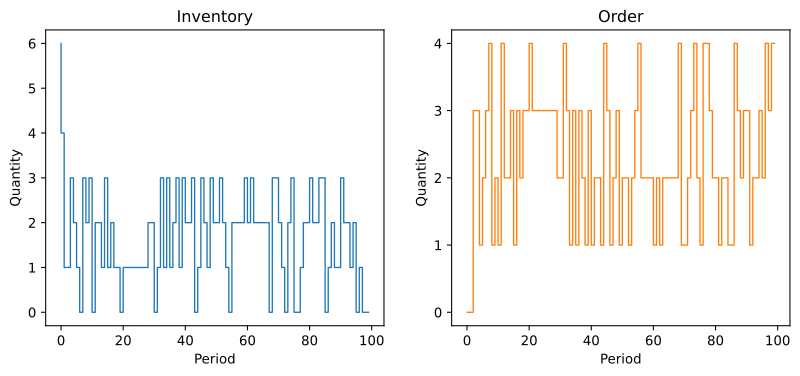
After completing training, we can inspect how the controller performs in the specified sourcing environment by plotting the inventory and order evolution.
>>> # Simulate and plot the results
>>> controller.plot(sourcing_model=single_sourcing_model, sourcing_periods=100)
The trained controller can be used to predict order quantities.
>>> # Predict order quantity for a given system state
>>> controller.predict(current_inventory=10, past_orders=[1, 5])
0